
Skip to content

Intel Retiree Organization

Sharing, Caring & Connecting

 
  • Home
  • Benefits
    • Intel Retiree Benefits
    • Important Benefit Dates/Milestones
    • Discounts Programs for Retirees
    • Donation Matching Programs
    • Volunteering Matching Program
    • Stock / SERP links
  • Healthcare
    • All Healthcare Announcements
    • Intel U.S. Retiree Information
    • U.S. SERMA Program
    • Healthcare Resources
  • Life After Intel
    • Age-based Retirement Decisions
    • Volunteering in Retirement
    • Careers/Networking
    • Retiree Stories
  • Calendars & News
    • Site Event Calendars
    • Past Newsletter Archive
  • About IRO
    • Introducing IRO
    • Join IRO
    • From the Leadership Team
    • IRO Committee Responsibilities & Members
    • IRO Volunteer Team Pages
  • Contacts
    • IRO Key Contact Points
    • Email Address Changes
    • Benefits Provider Contact Info
  • FAQs
    • Discount FAQs
      • Employee Discount Program
      • Employee Purchase Program (EPP) Storefront
      • @IntelRetiree.com Email Forwarder
      • McAfee LifeSafe(TM) Free Software Download
    • Healthcare FAQs
      • SERMA
      • IRMP pre-age 65
      • IRMP age 65+
      • COBRA
      • Medicare
    • FAQs for @intelretiree.com email
    • Donation Matching Guidelines & FAQs
    • Volunteer Matching Guidelines & FAQs
You are here: Home / Benefits / Donation Matching Programs / Volunteering In Retirement / Intel Retiree Business Card

Intel Retiree Business Card

Last modified on January 31, 2023

Create your Intel Retiree Business Cards

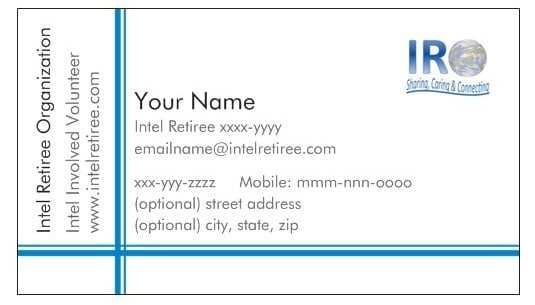
The Intel Retiree Organization has worked closely with Intel with to goal of developing a retiree “business” card that could be used to provide personal contact information while showing the retiree is a member of the “Intel Family”.   As you know Intel is very protective of its logo and how its name is used which limited our options on having the card look similar to an Intel Business card.   The resulting business card design has been approved by Intel and the IRO Leadership Team.    This is how the card looks:
BizCard

To create your personalize card:

  1. Go to Vistaprint.com
  2. Select “Business Cards”
  3. Pick the quality of card you want and then “Get Started”
  4. Choose “Browse Our Designs” and enter keyword “898410″ to access the approved template
  5. Select the first design and fill in the fields as shown in the example above (you may customize anything but the Intel Retiree Organization field).
  6. Add an Image.  If you plan to use the IRO logo (as shown on the example), you will need to download it to your device. To download the IRO logo image file from the IRO website:

IRO logo

Click on the above IRO Logo
Right Click on this actual logo (IRO-logo.jpg) and save image (IRO-logo.jpg) to your device.

Select the Image Icon on “Customize Your Standard Business Card – Front Side” and navigate to the downloaded location of the IRO logo on your device.  You have the option to use a different image, if desired.

7.  Continue through the rest of the design, selecting other products if desired and set up an account to pay for your purchase.

You’re done!

Retirees in Action!

Copyright © 2026 Intel Retiree Organization --- Disclaimer --- Privacy Policy --- Website Issue?